
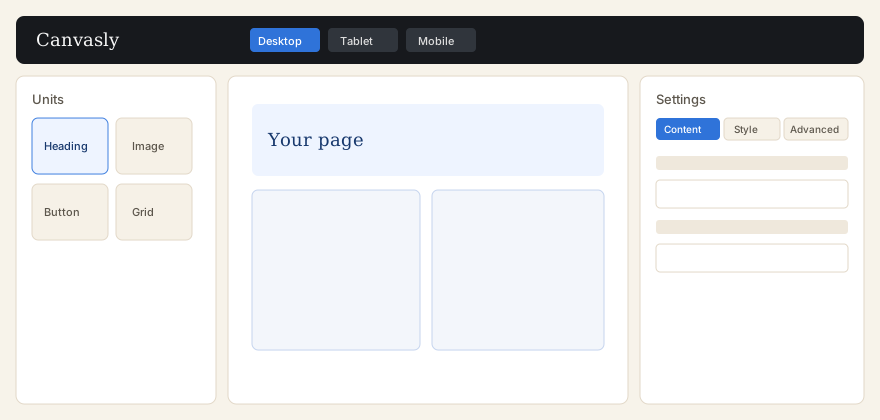
What you can do
- Open a page or post and choose Edit with Sidcraft, or use the same link in the WordPress admin bar.
- Drag units such as Heading, Image, Button, Container, and Grid onto the page, or onto Drag widget here at the bottom. A unit dropped there is wrapped in a new container (one Undo removes both). Container, Grid, and Inner Section are placed directly. The same drop works in Firefox. The top bar also inserts XEditor elements: Div Block, Flexbox, Grid, Heading, Paragraph, Image, and Button. Each of those prints one HTML element.
- Switch the canvas between desktop, tablet, and mobile. Extra sizes can be turned on under Design System. Style → Items sets flex direction, justify, align, gaps, and wrap on containers and widgets.
- Open the AI Chat Bot next to XEditor and describe a change. You get a plan to preview on the canvas, then apply as one undo step. Upload or paste HTML to turn it into native layout, with no AI needed. See AI Chat Bot.
- Save reusable templates, then place them with a shortcode, a WordPress block, a Sidcraft Template unit, or a sidebar widget.
- Protect forms and the Login unit with Cloudflare Turnstile under Settings → Integrations. The submit or log-in button stays off until the visitor passes the check. Form submissions are kept under Sidcraft → Form Entries, even when the notification email fails.
- With Sidcraft Pro, rebuild a screenshot or mockup as a native page in the AI Chat Bot, and design a header and footer, popups, Loop Grid and Loop Carousel, shop layouts (when WooCommerce is installed), and payment forms. Pro’s Login & Register and Payment Form units can require Turnstile.
- Sidcraft Pro also adds the SCB widget set: 40+ more units in the PRO group, such as Advanced and Fancy Heading, Info Box, Modal Popup, Posts skins, Business Hours and Reviews, FAQ and HowTo schema, Instagram and X feeds, form stylers, and WooCommerce widgets. Turn them on or off under Settings → SCB Widgets. See SCB widget set.
These pages describe Sidcraft Page Builder 1.2.4 and Sidcraft Builder Pro 1.2.3, as named in the plugin files. Sidcraft Pro is the short name for the Sidcraft Builder Pro plugin. WordPress 6.9 or newer and PHP 7.4 or newer are required. The readme lists testing through WordPress 7.1. MySQL 5.7 or MariaDB 10.3 or newer is listed as a minimum. Pro loads only when Sidcraft Page Builder is active and at least version 0.14.1. The AI Chat Bot needs Sidcraft Page Builder 1.2.1 or newer, and chatting with AI in the free plugin needs WordPress 7.0 or newer.