
YouTube and Vimeo are easy, but your videos live on someone else's platform, next to their branding and their recommendations, under their rules. If you run a film festival, an online course, a webinar library, a church or club archive, or a members-only video site, you probably want the videos on your own WordPress site, in your own player, and maybe paid for.
VidCellar is a self-hosted WordPress video plugin for that. VidCellar Lite is free: a video library, a white-label player and adaptive streaming, with your files on your server. VidCellar Pro adds what you need to earn from your videos: pay-per-view, membership plans, ads, analytics, a video editor, live streaming and cloud storage.
VidCellar Lite vs Pro at a glance
| Feature | Lite (free) | Pro |
|---|---|---|
| Video library, categories, ratings, thumbnails, trailers | ✓ | ✓ |
| White-label player, chapters, captions, transcript, mini-player | ✓ | ✓ |
| Adaptive HLS streaming, up to 4K when the source allows | ✓ | ✓ |
| Resumable uploads up to 30 GB | ✓ | ✓ |
| Encrypted HLS, signed links, anti-hotlinking, watermark | ✓ | ✓ |
| Every video free to watch, no license key | ✓ | Uses Lite |
| Who can watch: roles and membership plugins | — | ✓ |
| Pay-per-view, guest checkout, Stripe and PayPal | — | ✓ |
| Paid membership plans and a front-end member area | — | ✓ |
| Complimentary coupons | — | ✓ |
| Ads and lead-capture overlays | — | ✓ |
| Video editor: trim, cut and colour correction | — | ✓ |
| Analytics, GA4, Tag Manager, Meta Pixel, webhooks | — | ✓ |
| Email marketing sync for overlay opt-ins | — | ✓ |
| Live streaming, chat and emoji reactions | — | ✓ |
| Cloud storage and CDN offload | — | ✓ |
| Sales reports | — | ✓ |
VidCellar Lite: a free video library on your own server
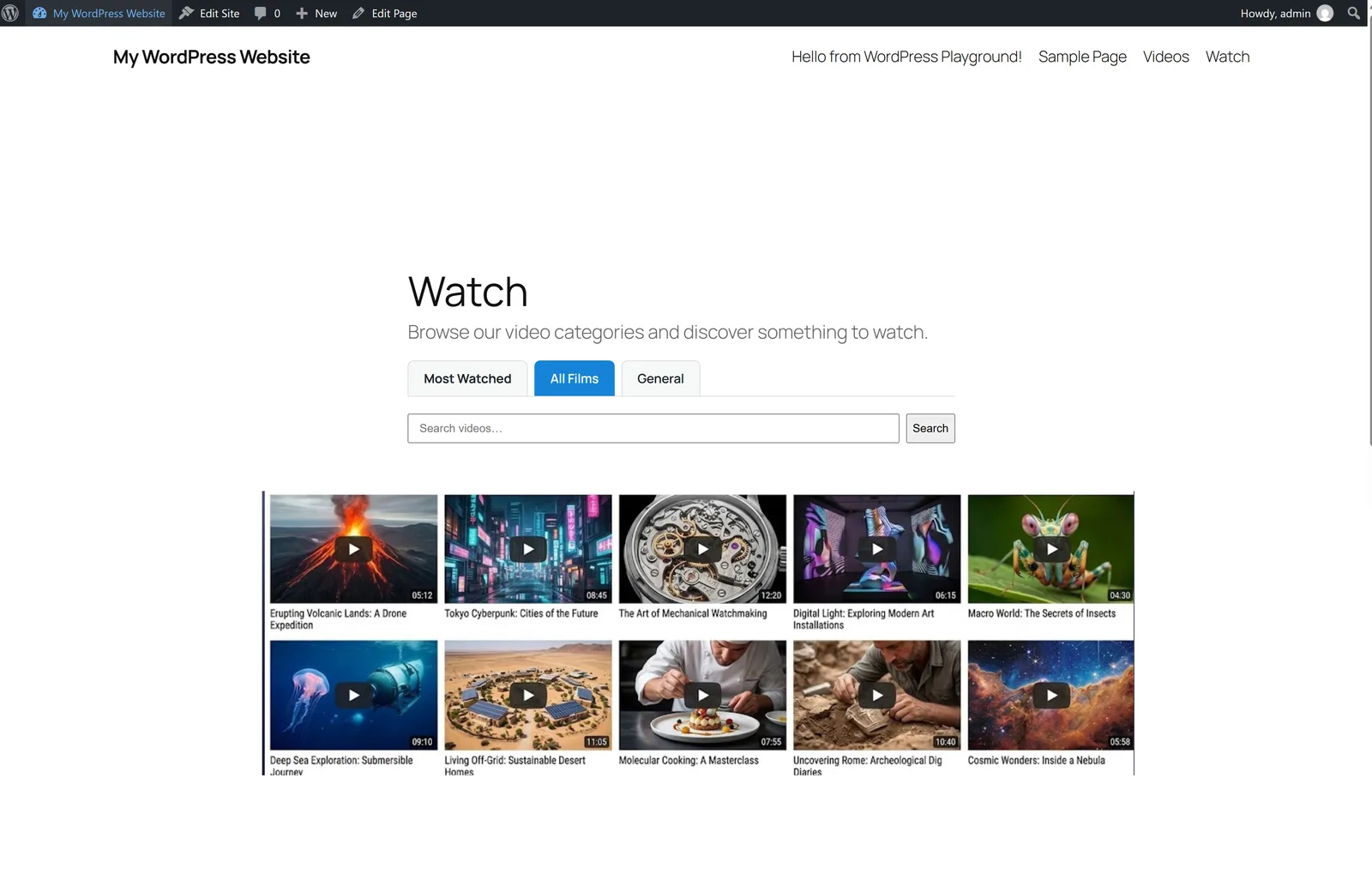
Install Lite and it creates two pages for you: Videos, a searchable catalogue, and Watch, a category browser with the player. Visitors browse categories, search by title, sort by Most Watched, watch trailers in a pop-up and rate videos from 1 to 5 stars. There's no separate video account and no third-party branding.
A white-label player that's fast to load
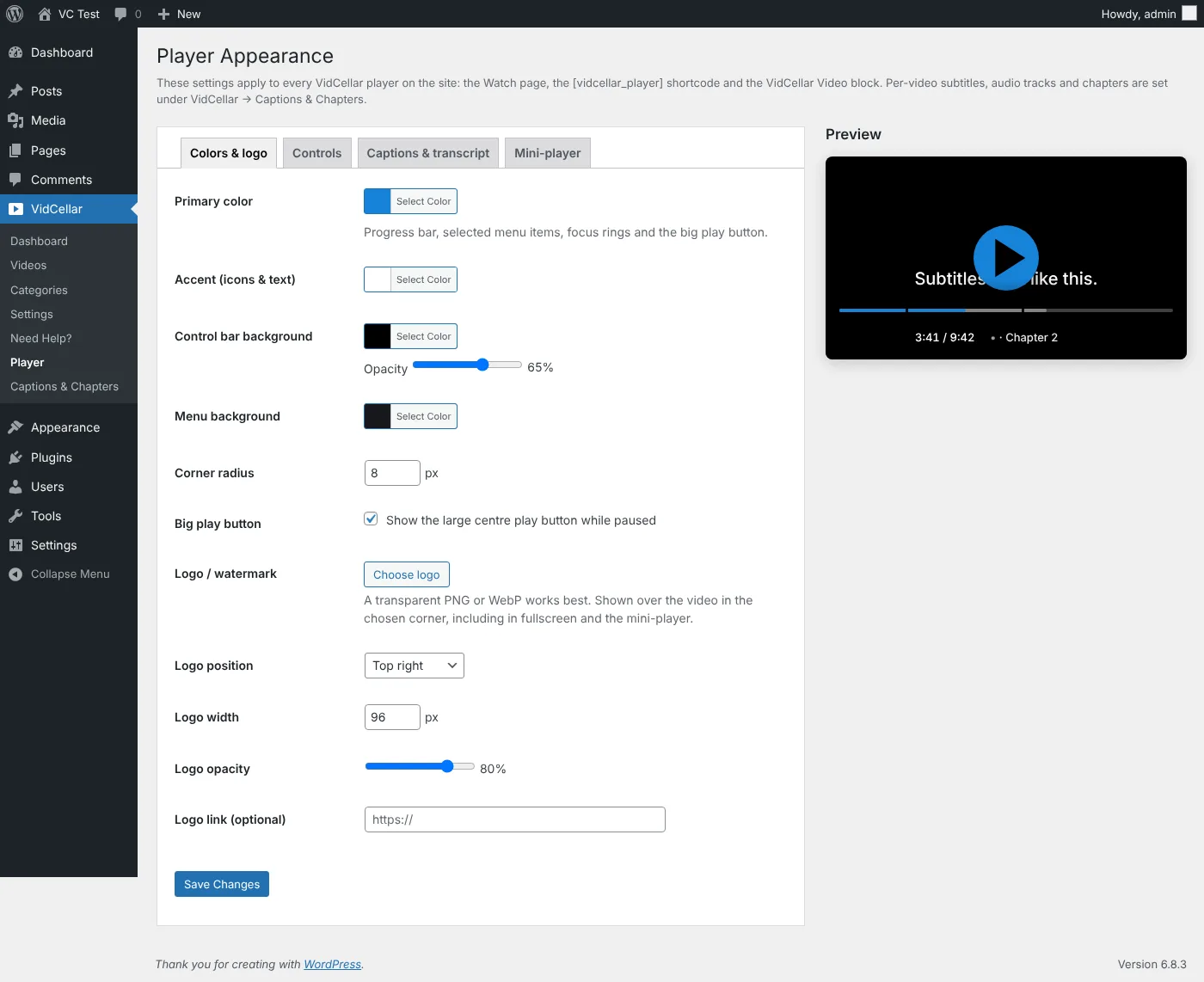
The player is yours: your colours, your logo or watermark, and your choice of controls. It includes:
- chapters with timeline markers and hover titles
- multi-language subtitles and alternate audio languages
- a searchable, synchronised transcript below or beside the video
- speeds from 0.25× to 2×, a quality menu (Auto, 1080p, 720p…), picture-in-picture, theater mode and fullscreen
- a sticky mini-player that docks to a screen corner as visitors scroll
It's also light. Until a visitor presses play, the page shows only a poster and a play button. No video element and no player library load before then, so your pages stay fast.
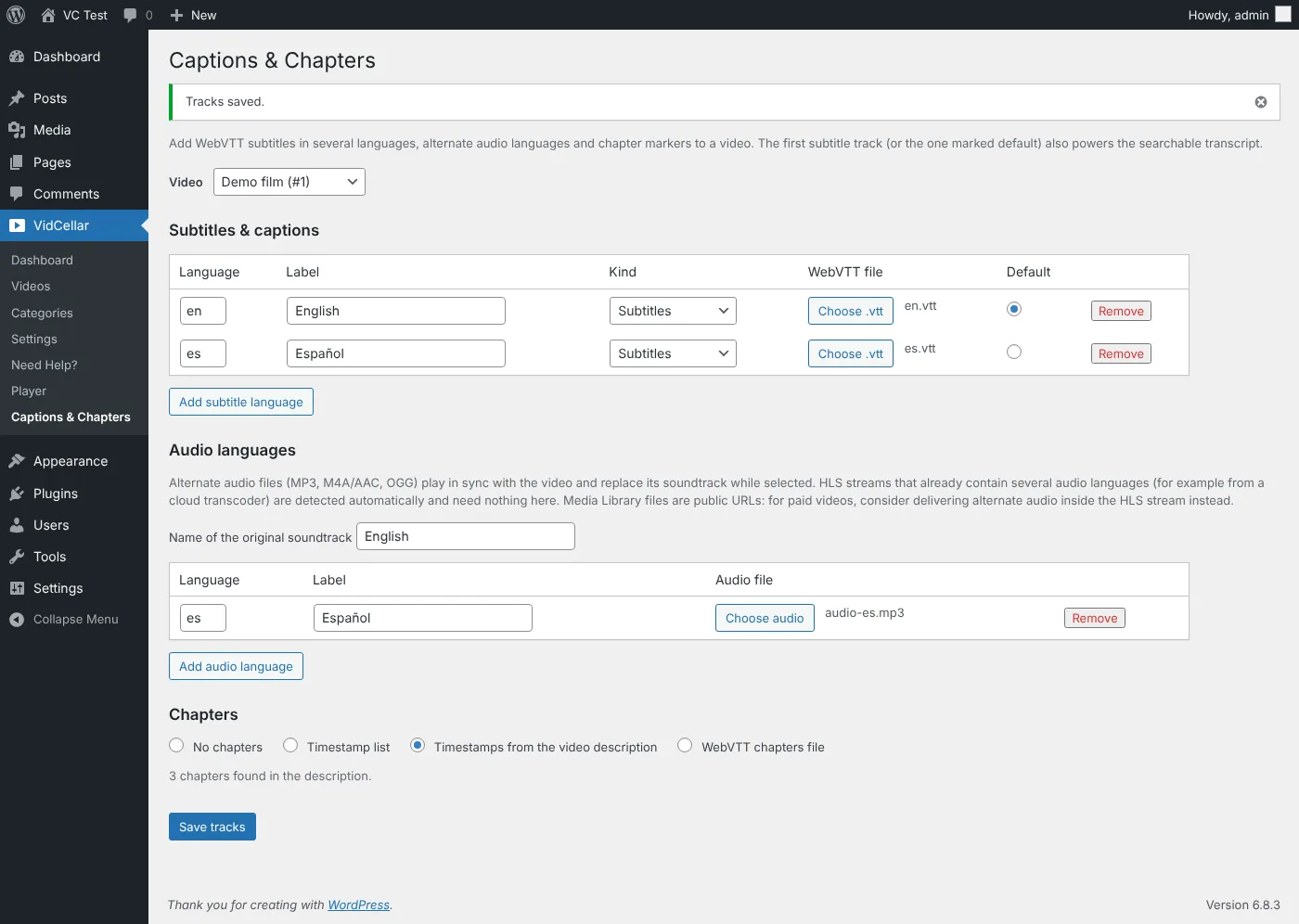
Chapters, subtitles and audio tracks are set per video under VidCellar → Captions & Chapters. You can even turn timestamps in the video description into chapters.
Adaptive streaming, like the big platforms
When FFmpeg is available on your server, VidCellar encodes each upload in the background into adaptive HLS renditions (360p up to 4K, never above the source). The player switches quality automatically to match each viewer's connection, with native HLS on Safari and iOS and an MP4 fallback everywhere. The Videos screen shows live encoding progress, and hardware encoders (NVENC, Quick Sync, VAAPI, VideoToolbox) are supported.
Big files are fine. Uploads go up in resumable chunks of up to 30 GB. If a chunk fails it's retried, and if the browser closes you can pick the same file and resume.
Content protection included, even in the free version
Self-hosting only helps if your videos stay yours. VidCellar Lite includes:
| Protection | What it does |
|---|---|
| AES-128 encrypted HLS | Every segment is encrypted on disk and in transit, with a key per rendition |
| Signed, short-lived links | Playlists, keys, segments and MP4 links expire and refresh while someone watches |
| Anti-hotlinking | Only your allowed sites can play the videos, with generated nginx and Apache rules |
| Moving watermark | Shows the viewer's email, username, IP, a live timestamp and a session ID over the video |
| Viewer-session log | Traces a leaked recording back to the session ID in its watermark |
Embed any video elsewhere on your site with the VidCellar Video block or the shortcode [vidcellar_player id="12"].
VidCellar Pro: earn from your videos

Decide who can watch
Lock videos to logged-in users, selected roles, or members of WooCommerce Memberships, MemberPress, Restrict Content Pro, Paid Memberships Pro or VidCellar's own plans, per video or per category. A locked video shows a paywall card over the player, and trailers stay available as a teaser.
Pay-per-view and membership plans
- Pay-per-view: set a price for any video. A buyer watches the full video for 7 days by default (or for life, if you set 0). Guests don't need a WordPress account, and the private watch link is emailed to them.
- Membership plans: create any number of monthly or yearly plans, paid with Stripe or PayPal. Members get a front-end account area with log-in, registration, purchases and membership details, and never need to see wp-admin.
- Paid sign-up: a new account is only created after payment is confirmed.
- Coupons grant complimentary access for 1 to 3,650 days, and the Sales Report lists every payment with a CSV export.
Ads, leads and analytics
- Advertisements: non-skippable pre-roll and mid-roll spots of 15 seconds or less.
- Lead capture and CTAs: pause the video at a timestamp for an email opt-in, a button or a purchase card. Opt-ins sync to Mailchimp, Kit, beehiiv, Klaviyo, Omnisend, Brevo, MailerLite, FluentCRM and MailPoet.
- Analytics: views, unique viewers, watch time, retention and completion, with events sent to GA4, Google Tag Manager, Meta Pixel and signed webhooks.
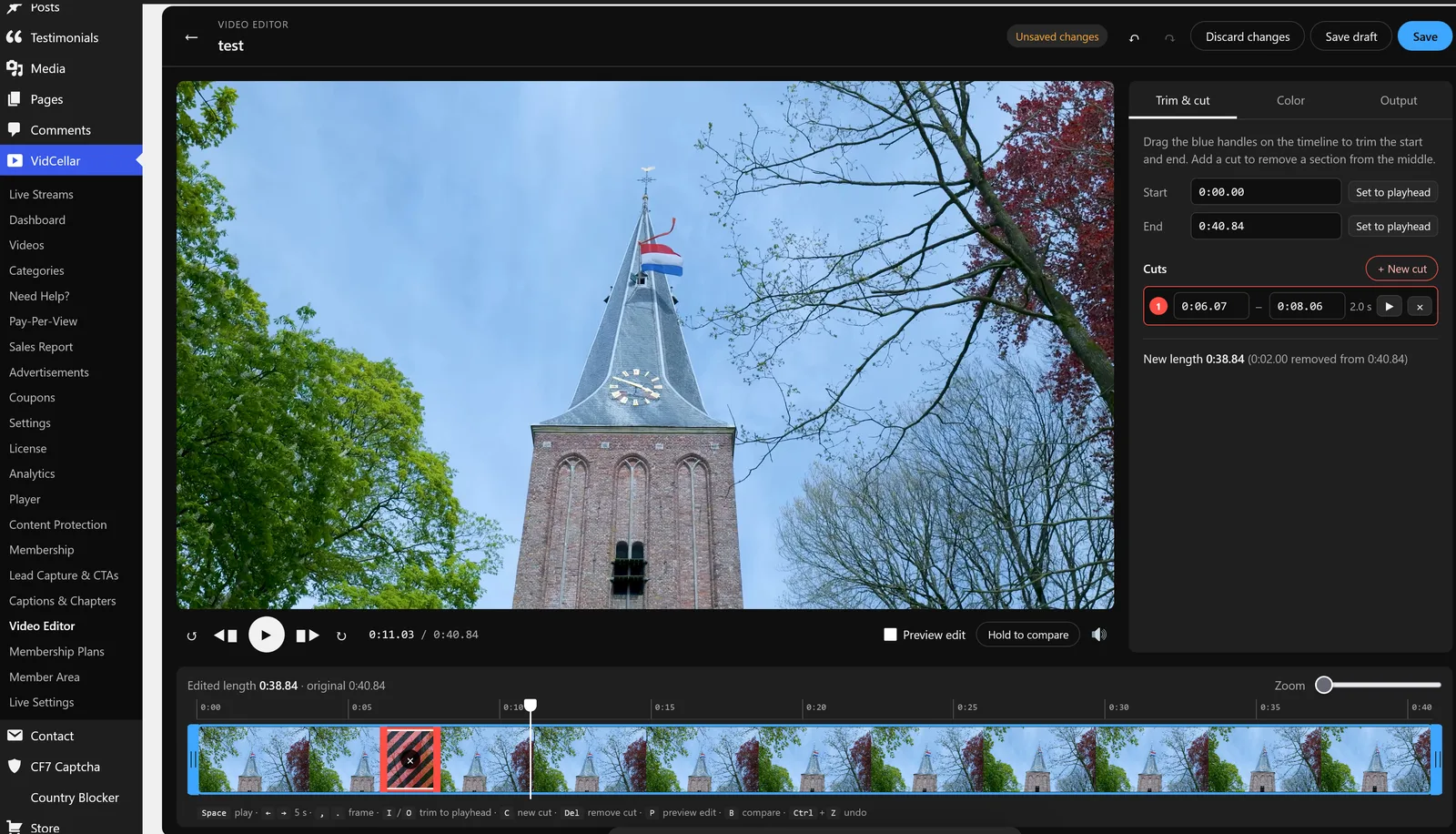
A video editor inside WordPress
Trim the start and end, cut out any number of sections, and colour-correct with presets or sliders, without leaving WordPress. FFmpeg renders the edit in the background and replaces the video on the site. Price, access rules, statistics and lead overlays stay with it. The original is kept, so you can change the edit or revert.
Live streaming and cloud storage
- Live Streams: ingest with RTMP, SRT or WHIP, play back with WebRTC (WHEP) and LL-HLS, with live chat and emoji reactions.
- Cloud offload: copy finished files to Bunny.net, Cloudflare Stream, DigitalOcean Spaces, Amazon S3, Cloudinary, Mux, Vimeo or YouTube.
VidCellar Pro pricing
Lite stays fully usable without a license. Every Pro plan has the same features. Plans differ only by the number of sites:
| Plan | Price | Sites |
|---|---|---|
| Pro Personal | $59 / year | 1 |
| Pro Business | $79 / year | 5 |
| Pro Agency | $129 / year | 25 |
| Pro Unlimited | $199 / year | 100 |
These are the prices of the VidCellar Pro license. The membership and pay-per-view prices your viewers pay are up to you.
How to get started
- Install VidCellar Lite. In WordPress, go to Plugins → Add New Plugin, search for VidCellar Lite, then install and activate it. It's also on WordPress.org.
- Add categories under VidCellar → Categories, such as Films, Webinars or Lessons.
- Upload a video under VidCellar → Videos, with a title, category, thumbnail and optional trailer, then click Build adaptive (HLS).
- Publish. Visit the Videos and Watch pages that Lite created, or embed one video with the block or shortcode.
- Add Pro when you're ready to charge for access. See VidCellar Pro pricing.
You need WordPress 6.2+ and PHP 7.4+. Local HLS encoding needs FFmpeg on a Linux or macOS host. Without it, videos still play as MP4.
Read more in the VidCellar guides: Lite, Pro, installation and what visitors see. Building the rest of your site? Sidcraft Page Builder is our free, lightweight WordPress page builder with AI.
Frequently asked questions
Is VidCellar Lite really free?
Yes. VidCellar Lite is free on WordPress.org under GPLv2 or later. It needs no license key and no external video account, and every video in Lite is free to watch.
Where are my videos stored?
On your own WordPress server, in private storage. Lite does not send video files to a remote video service. With Pro you can optionally copy finished files to Bunny.net, Cloudflare Stream, DigitalOcean Spaces, Amazon S3, Cloudinary, Mux, Vimeo or YouTube.
Do I need FFmpeg?
Only for adaptive HLS streaming and the Pro video editor. Without FFmpeg, visitors still play the original MP4. Local HLS encoding needs FFmpeg and ffprobe, PHP proc_open() and a Linux or macOS host.
Can I sell videos or memberships with VidCellar?
Yes, with VidCellar Pro. Set a pay-per-view price for each video, create monthly or yearly membership plans, and take payments with Stripe or PayPal. Guests can buy a single video without a WordPress account.
How do I stop people downloading or sharing my videos?
VidCellar Lite includes AES-128 encrypted HLS, short-lived signed links, anti-hotlinking, a moving watermark with the viewer's details, and a viewer-session log to trace a leaked recording. The browser download control is turned off in the player.
What are the requirements?
WordPress 6.2 or newer and PHP 7.4 or newer. VidCellar Pro requires VidCellar Lite to be installed and active, and both should be updated together.
Facts in this post come from the VidCellar documentation for VidCellar Lite 2.3 and VidCellar Pro 2.8. Product names of payment, storage, analytics and email services are trademarks of their owners.