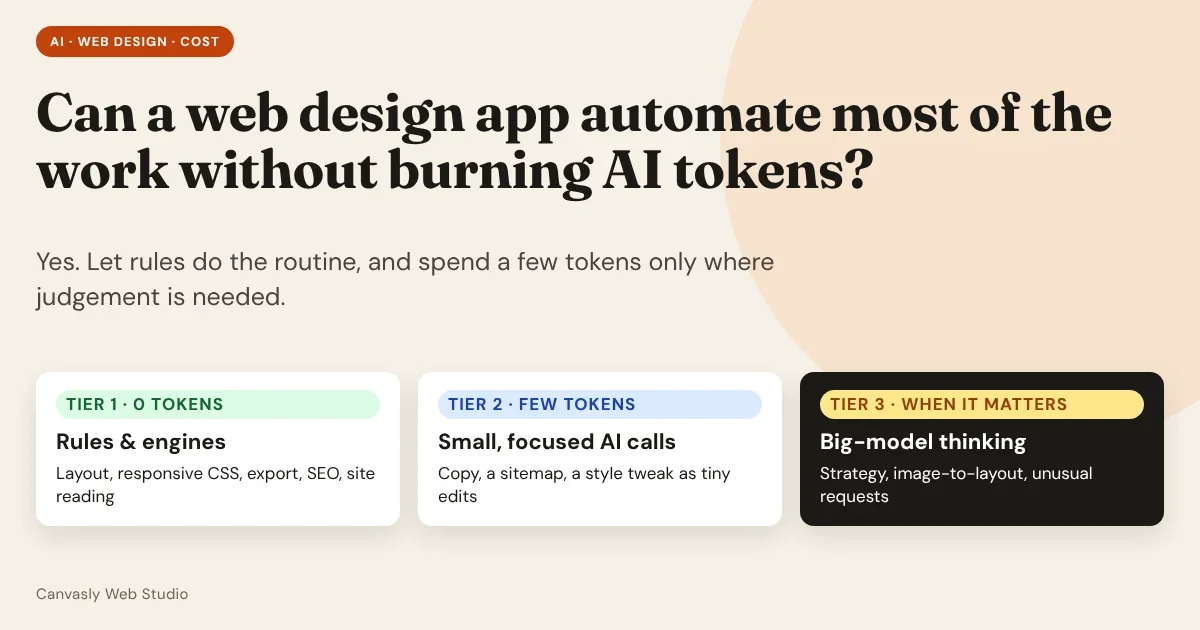
Yes, a web design app can do most of its work without spending a single AI token, and keep the tokens it does use small. The trick is a design choice, not a better model: let ordinary code (rules, templates and engines) handle everything that has a right answer, and ask the AI only the questions that rules cannot answer.
This article explains why most web design work doesn't need a model, five design rules for building an app that way, and how Canvasly Web Studio applies them today, including where it still calls an AI and where it deliberately doesn't.
Don’t ask a model to do what a rule can do. Ask it only what a rule can’t.
- Rules and engines: layout, styling, export, checks. Free, instant, repeatable.
- AI: wording, planning, judgement. Small, focused, on purpose.
The short answer
Why most design work doesn't need an AI
An AI model is the right tool when there is no single correct answer: writing a headline, choosing a tone, planning a site for a bakery. It is a poor tool, and an expensive one, when the answer is already known.
Look at what happens in a typical day of building websites:
| Task | Does it need an AI? | Why |
|---|---|---|
| Moving, resizing and aligning elements | No | It is geometry |
| Making a layout work on phone, tablet and desktop | No | It is CSS and breakpoints |
| Exporting to WordPress, Astro, Hugo or plain HTML | No | It is a compiler: the same input always gives the same output |
| Adding SEO titles, descriptions, canonical links and structured data | No | It is a template filled from the page |
| Checking contrast, alt text and heading order | No | These are rules, written down in standards |
| Reading an existing website and rebuilding it | Mostly no | It is parsing and mapping |
| Writing copy, planning a sitemap, choosing a tone | Yes | It is judgement |
| Turning a screenshot into a layout | Yes | It is interpretation |
Count the rows. The routine work is the large majority, and none of it benefits from a model. A model can do it, but it does it slowly, at a cost, and with a small chance of a different answer every time.
Five design rules for a low-token design app
1. Make the design a structured document
If a page is a pile of generated HTML, the only way to change it is to regenerate it, which means sending and receiving thousands of tokens for a one-word edit. If the page is a structured document (a tree of named units with properties and styles), every change can be small and exact.
Canvasly Web Studio keeps each project as a document of 155 ready-made units with their own properties and styles. The page you see, the preview and every export are all produced from that one document.
2. Edit with small operations, not whole pages
When the document is structured, an AI doesn't need to return a page. It can return a handful of operations. Canvasly's editing layer works this way: its source describes operations such as insert, update, move, duplicate and remove, applied to the document without changing the original, and each AI chat turn is described there like this: "the model replies with document ops which are validated and applied as ONE undoable step."
Here is what "make this heading pink" costs as an operation:
{ "op": "update", "id": "n_12",
  "styles": { "desktop": { "base": { "color": "#c2185b" } } } }
That is a few dozen tokens. Regenerating the section as HTML is hundreds, and you would have to check that nothing else changed. Operations are also validated before they run and undoable in one step, so a wrong answer costs one click, not a rebuild.
3. Put rules before models
Design the app as a cascade. Every request tries the cheapest tier first:
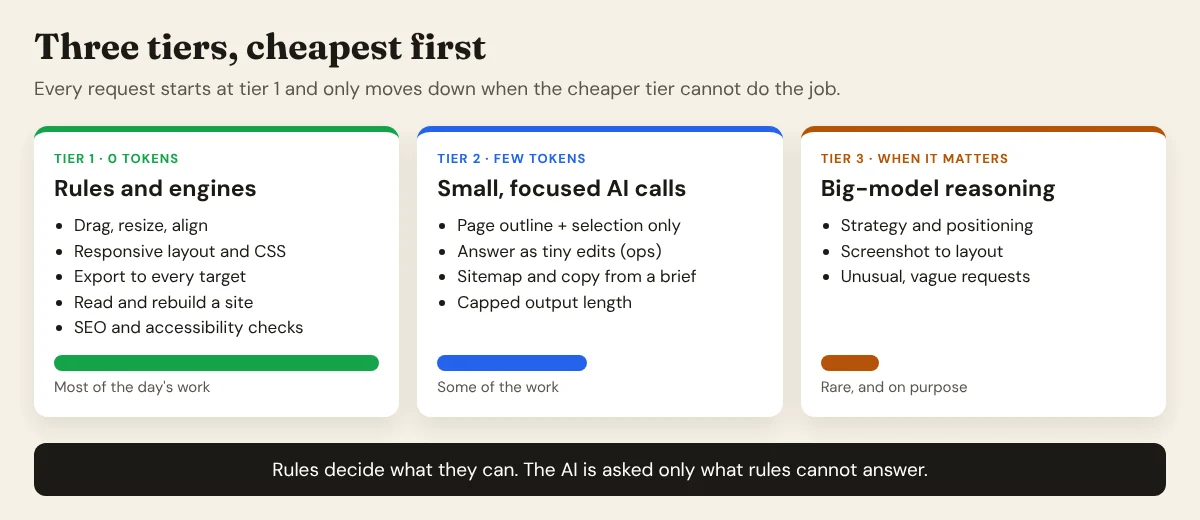
- Rules and engines answer anything with a known answer. Cost: zero tokens.
- Small, focused AI calls handle the judgement parts, with only the context they need.
- A big model is used rarely and on purpose, for strategy or unusual requests.
The key is that the app, not the user, decides which tier a task goes to, and the default is the cheapest one.
4. Send the model only what it needs
The biggest hidden cost in AI features is context: sending the whole project, every time. A design app can avoid most of it. Canvasly's AI panel sends "the current page outline and selection" and asks for operations back, instead of the whole project. We measured what that saves, and one honest finding, in the numbers below.
5. Cap, cache and reuse
Three habits keep the remaining tokens small:
- Cap the output. Every provider call in Canvasly has a maximum output length (16,000 tokens by default, and 6,000 for the AI Site Planner's smaller tasks), so a runaway answer can't run up a bill.
- Cache the fixed part. A long prefix that never changes, such as a catalogue of what the app can build, is what provider prompt caching is for.
- Ask for structure. Requesting JSON or operations instead of prose avoids chatter and makes the answer checkable by code.
- Save results. A plan, a style or a piece of copy that has been approved is stored in the project. It is never paid for twice.
What this looks like in Canvasly Web Studio
Here is where Canvasly spends no tokens, and where it spends a few.
Zero tokens
- The Redesign wizard. It reads a website you own, keeps its text, pictures and colours, and builds a modern, multi-page project from native units. Its source is a reader plus a builder: there is no model in the loop. How it works.
- Website import and HTML import. Bringing in an existing site or HTML page is parsing and mapping, done on your computer.
- The Landing Page Generator. It runs a bundled generator that writes self-contained landing pages and a gallery into a folder on your computer. It builds pages in bulk, with no AI call per page. Read more.
- Export and publishing. WordPress Site Kit, Next.js, Astro, Hugo, Vercel, Netlify and the rest are a compiler. All export formats.
- The editor itself. Dragging, styling, motion, responsive breakpoints, undo and redo. None of it asks a model anything.
A few tokens, on purpose
- The AI assistant panel. Page outline and selection in, operations out, as one undoable step.
- The AI Site Planner. A short brief becomes a sitemap with real copy, wireframes and a site style. Even here, the app never depends on the AI: the source comment for its fallback reads "A complete plan from the brief alone (no AI key, or the AI is unavailable)". See the planner.
- Your choice of provider and key. Canvasly calls the provider directly with your own key: Anthropic Claude, OpenAI, Google Gemini or Azure OpenAI. You pick the model and the price, and you can choose a smaller, cheaper model for routine requests.
When you bring your own AI assistant
Canvasly also has an MCP server. Turn it on and an AI app such as Claude Code, Claude Desktop or Cursor can build in Canvasly through the Model Context Protocol. This is a token saver in its own right. Without it, an assistant that wants to build a site has to write every page as code, which costs output tokens for every line. With it, the assistant sends a short instruction to a tool and the tool does the heavy lifting on your machine: the layout, the styling, the compile, the copying of media. The model spends tokens deciding what to do, not typing out how.
The measured numbers
We stopped estimating and measured. We ran Canvasly Web Studio 2.9.6 against a real, public website, keystone.canvasly.pro (a 13-page contractor site), and counted tokens for everything involved.
How we measured. Tokens were counted with the o200k_base tokenizer as a stand-in. Claude and other models count a little differently, so treat the absolute figures as approximate. The ratios between them are what matter. We counted the real prompts Canvasly sends, the real output of its compiler, and the real size of what a model would have to write to produce the same pages. "Model writes it as code" means the readable, unminified HTML and CSS that Canvasly's compiler produced for the same pages. A model could write somewhat leaner CSS, so read that row as a ballpark.
1. Planning and building a five-page site
The five pages are Home, About, Services, Projects and Contact, using the site's real copy.
| Step | Output tokens | Input tokens |
|---|---|---|
| Canvasly: the AI Site Planner writes the plan with the pages' real copy | about 2,000 | 625 (the planner's instructions plus the brief) |
| Canvasly: building the five pages from the plan | 0 | 0 |
| Alternative: a model writes the five pages as HTML | about 13,000 | (the brief) |
| Alternative: the same, plus the CSS | about 32,000 | (the brief) |
The plan costs roughly 6 to 16 times fewer output tokens than writing the pages as code, and the build itself costs nothing. (The planner's own offline plan, with every field filled, is 2,216 tokens, so the real figure is in the 2,000 to 4,000 range depending on how much copy the AI writes.)
2. Rebuilding a site you already own
| Step | AI tokens | Time |
|---|---|---|
| Canvasly Redesign wizard: read all 13 pages | 0 | 3.6 seconds (mostly the network) |
| Build the project and copy all 33 pictures | 0 | 0.9 seconds |
| Compile the whole site | 0 | 41 milliseconds |
| Export to Astro, Hugo or a WordPress Site Kit | 0 each | 18, 13 and 11 milliseconds |
| Alternative: a model writes the same 13 pages as code | about 67,000 output tokens (35,000 HTML and 32,000 CSS) | minutes |
If you drive Canvasly from an AI assistant over MCP, starting the same job is a tool call of about 21 tokens. The tool does the rest on your computer.
3. A small edit: "make this heading pink"
| Way of doing it | Tokens |
|---|---|
| Inspector: pick the colour yourself | 0 |
AI returns one operation (update with the new colour) |
about 26 out |
| AI regenerates the section as HTML | about 276 out |
| AI chat turn in Canvasly: what is sent in | about 13,500 in |
| Sending the whole project as context instead: a 5-page site | about 18,000 in |
| Sending the whole project as context instead: the 13-page site | about 45,700 in |
Read the last three rows together, because they carry the most important finding.
The outline is small, but the catalogue is not. Of the roughly 13,500 tokens Canvasly sends with a chat turn, about 12,250 are the fixed catalogue of its 155 units, so the model knows what it can build. The page outline and selection are only about 500. That catalogue is the same on every turn, and the outline stays about the same size as the site grows, so on the 13-page site the chat turn is about 3.4 times smaller than sending the whole project. But for a single tiny edit it is not the cheapest route: handing a model just the page's HTML (about 3,500 tokens for the home page) and asking it to return the changed section would use fewer input tokens. And the cheapest route of all is the inspector, at zero.
That is the tier idea working as intended: tiny edits belong to tier 1, the controls you can click. The chat belongs to bigger jobs, such as "add a pricing section with three plans and a FAQ", where a model writing a dozen operations saves far more than the context costs. It also points to a clear saving. A fixed 12,000-token prefix repeated on every turn is exactly what prompt caching is for, and Canvasly doesn't currently ask providers to cache it. That's an improvement we should make.
Where AI is still worth the tokens
Cutting tokens isn't the goal. Cutting wasted tokens is. Some jobs are worth every token:
- First drafts of words. Headlines, descriptions and calls to action, where a blank page is the real cost.
- Planning. Turning a vague business description into pages and sections.
- Interpretation. Turning a screenshot or sketch into a starting layout.
- Unusual requests. Anything a rule can't anticipate.
For these, a good app keeps the request small, shows you the result before applying it, and lets you undo it.
The honest limits
Rule-based automation isn't magic, and a fair version of this argument admits where it struggles:
- Rules are brittle at the edges. They do exactly what they were written to do, and the web is messy. When we tested the Redesign wizard on a seven-page contractor site, one rule skipped every picture in a photo gallery, because galleries are often marked up as lists. The fix was a small rule change, with no model involved, and it is now covered by a test. That is the trade: rules need maintenance, but once fixed they stay fixed.
- Rules can't judge taste. They'll keep your layout consistent. They won't tell you it's dull.
- Fixed prompts add up. Our own measurements show the unit catalogue is about 90% of every chat turn. The fix is caching and a smaller catalogue, not abandoning the approach.
- Cheap tiers need good routing. If the app sends a task to the wrong tier, you either overspend or get a poor result.
- Saving tokens isn't the only measure. A slightly more expensive call that saves you an hour is the better deal. The point is to not pay for work a rule would have done better.
So, can it be written?
Yes. The recipe is a structured document, a small language of operations, a compiler for output, a library of reusable units, and a cascade that sends each request to the cheapest tier that can answer it. Add a clear fallback for when no AI is available, and a way to bring your own key and model.
That's the approach behind Canvasly Web Studio: most of what it does is plain, fast, repeatable code that never touches an AI, and the AI is used where judgement actually matters, in small, undoable steps.
Want to see how far a design app can get without spending tokens? Download Canvasly Web Studio and try it free for 7 days. Rebuild a site with the Redesign wizard, generate pages, export to WordPress, Astro or Vercel, and turn the AI on only when you want it.