
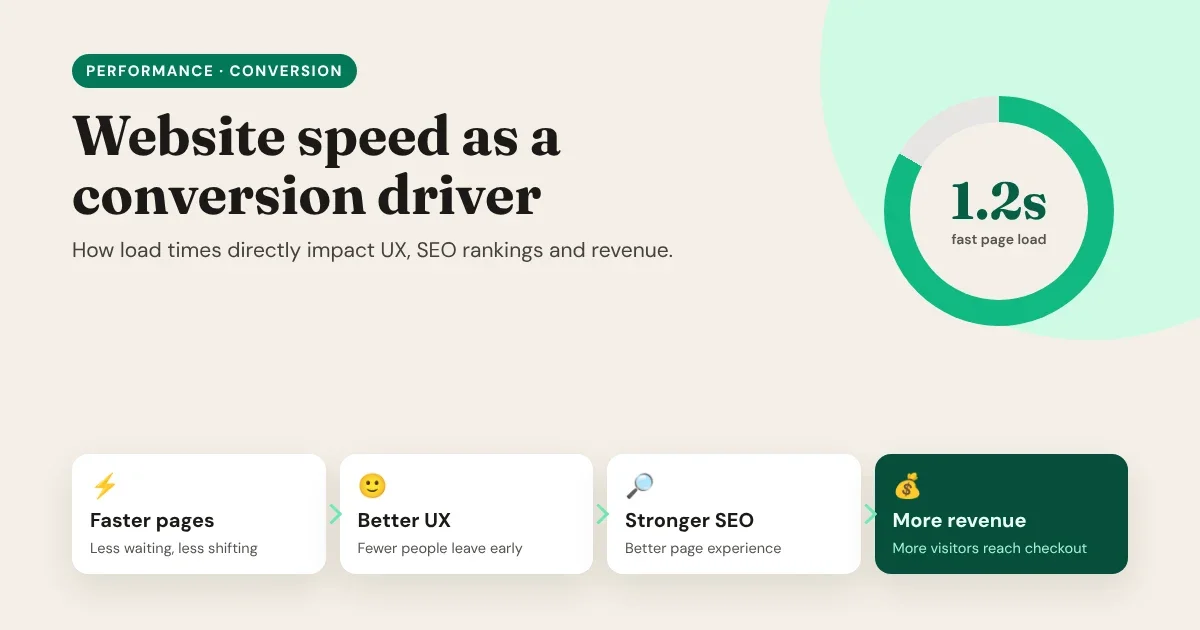
Every second a page takes to load is a second a visitor spends deciding whether to stay. Speed isn't a technical detail for developers to worry about after launch. It shapes the first impression of your brand, how Google sees your pages, and how many visitors make it to "Buy", "Book" or "Subscribe". In other words, speed is one of the few improvements that helps your user experience, your SEO and your revenue at the same time.
This guide explains how load times affect each of these, how to measure your own site honestly, and what actually makes pages fast.
Your visitors don’t see your load time. They feel it, and they decide whether to stay before your page has finished deciding what to show.
- UX: fewer people leave before the page appears.
- SEO: a better page experience for search engines to reward.
- Revenue: more visitors reach the checkout.
Why speed matters
The chain reaction: speed → UX → SEO → revenue
Speed doesn't affect revenue directly. It works through a chain:
- Faster pages show content sooner and react to taps and clicks right away.
- Better user experience: fewer people give up while the page loads, and more of them keep reading and clicking.
- Stronger SEO: search engines want to send people to pages they'll enjoy, and page experience is part of how Google evaluates that.
- More revenue: more visitors stay, more of them reach your forms and checkout, and more of them complete it.
Break the first link and every link after it gets weaker.
How load time shapes user experience
People don't experience "load time" as one number. They experience a sequence of moments: Is anything happening? Is this the page I wanted? Can I use it yet? Why did it just jump? A slow site fails at one of those moments, and visitors notice.
Research by Google has put numbers on it. In one analysis of mobile pages, the probability of a visitor bouncing rose by 32% as load time went from 1 to 3 seconds, and by 90% from 1 to 5 seconds (Think with Google, 2017). The longer people wait, the more of them never see your content at all.
Speed problems also hurt after the page appears:
- Slow responses to taps and clicks make a site feel broken, and people tap again or leave.
- Layout shifts move buttons just as someone reaches for them, causing mis-taps and frustration.
- Heavy pages drain mobile data and battery, which matters most to visitors on slower connections and older phones.
How speed affects SEO
Google uses a set of page experience signals in its ranking systems, and the main speed-related ones are the Core Web Vitals:
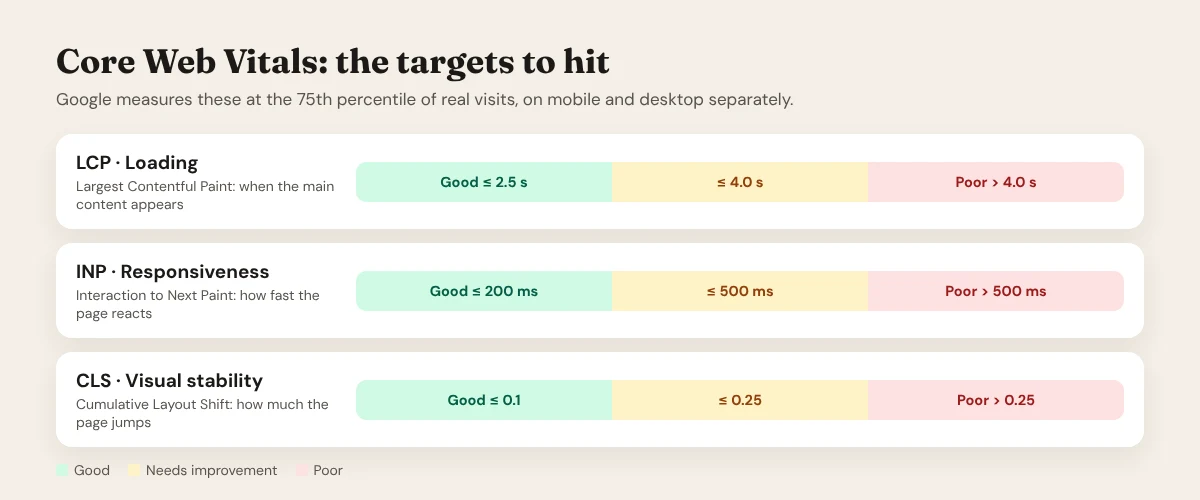
- Largest Contentful Paint (LCP) measures loading: how long until the main content, usually the hero image or headline, appears. Good is 2.5 seconds or less.
- Interaction to Next Paint (INP) measures responsiveness: how quickly the page reacts to clicks, taps and typing. Good is 200 milliseconds or less. INP replaced First Input Delay (FID) as a Core Web Vital in March 2024.
- Cumulative Layout Shift (CLS) measures visual stability: how much the content moves around as it loads. Good is 0.1 or less.
A page passes when at least 75% of real visits meet the "good" threshold.
It's worth being honest about how much this matters for rankings. Google has said clearly that relevant, helpful content comes first; a fast page with weak content won't outrank a slower page that answers the question better. Speed works more like a tie-breaker and a multiplier: when content is comparable, the better experience has the edge, and every visitor that search sends you is more likely to stay. Speed also helps search engines crawl your site more efficiently, which matters for larger sites.
Speed won’t rescue weak content, but it decides how much value great content can earn.
- Content and relevance come first.
- Speed is the tie-breaker and the multiplier.
Speed and SEO, honestly
How speed affects revenue
The link between speed and money is the most consistently measured part of the chain. In the study Milliseconds Make Millions (Deloitte Digital with Google, 2020), a 0.1-second improvement in mobile site speed was associated with an 8.4% increase in conversions for retail sites and 10.1% for travel sites.
Your own numbers will be different, but the pattern is the same almost everywhere:
| Where speed shows up | What a slow site costs |
|---|---|
| Landing pages | Paid clicks that leave before the page loads: you pay for visitors you never get |
| Product and pricing pages | Fewer people browse further, compare and add to cart |
| Forms and checkout | Abandoned sign-ups and payments at the most valuable step |
| Return visits | A slow first visit makes people less likely to come back |
| Mobile | The slowest networks and devices are often where most of your traffic is |
The good news: speed improvements compound. A faster site gets more out of every marketing channel, every piece of content and every ad you pay for.
Measure first: lab data vs. field data
Before changing anything, measure where you stand. There are two kinds of data, and you need both:
- Field data comes from real visitors on real devices and networks. It's what Google uses for Core Web Vitals. Find it in PageSpeed Insights (the "Discover what your real users are experiencing" section) and in the Core Web Vitals report in Google Search Console.
- Lab data comes from a test run in controlled conditions, such as Lighthouse in Chrome DevTools or the lower half of PageSpeed Insights. It's ideal for finding why a page is slow and checking a fix before you ship it.
A few tips for honest measurement:
- Test on mobile first. Mobile is usually slower, and it's what Google primarily uses to evaluate your site.
- Test the pages that make money, not just the home page: landing pages, product pages, pricing and checkout.
- Re-test after every major change. New plugins, scripts and images are how fast sites become slow ones.
What actually makes pages fast
Most slow websites are slow for the same handful of reasons. Fix these, in roughly this order, and you'll solve most problems.
1. Send less: page weight and requests
Every script, stylesheet, font and image has to be downloaded, and scripts also have to be run. The fastest code is code you never send. Remove unused plugins and features, avoid loading a whole library for one effect, and combine and minify CSS and JavaScript. Our post on the minimalist web stack vs. heavy page builders explains why bloated page builders struggle here.
2. Optimize images
Images are usually the heaviest part of a page. Use modern formats like WebP or AVIF, resize images to the size they're actually displayed at, lazy-load images below the fold, and give every image a width and height so the browser reserves space and the layout doesn't jump. Don't lazy-load the hero image: it's often your LCP element, so it should load first.
3. Don't block the first render
Load JavaScript with defer (or async where appropriate) so it doesn't hold up the page. Keep the CSS needed for the first screen small, and use preconnect for third-party origins you'll definitely need, such as a font service.
4. Be careful with fonts
Use one or two font families, only the weights you need, and the WOFF2 format. Use font-display: swap so text appears immediately in a fallback font, and pick fallbacks of a similar size to reduce layout shifts.
5. Serve from close to the visitor
Static files served from a CDN reach visitors from a nearby location, so even visitors on the other side of the world get a fast first response. Pre-rendering pages (static or incremental generation) means the server doesn't have to build each page on every visit.
6. Speed up the server and database
For dynamic sites, a slow Time to First Byte often comes from slow database queries, missing indexes or no caching. Our guide to database performance tuning covers these fixes step by step.
7. Audit third-party scripts
Chat widgets, trackers, heatmaps, A/B testing tools and embedded social feeds often cost more speed than everything else combined, and they're added one at a time. Review them every few months: keep what earns its place, load the rest later or remove it.
The fastest code is the code you never send.
- Fewer scripts and plugins.
- Smaller, modern images.
- Pages served from close to the visitor.
The first rule of performance
How Canvasly Web Studio builds for speed
We built Canvasly Web Studio so that the fast choice is the default choice. Here's what the compiler does when it builds your site:
- Only the code you use. Each exported site gets one stylesheet and one small runtime script containing only the features your pages actually use. A page with no interactive units gets no runtime script at all. There's no page-builder framework loaded on every page "just in case".
- Minified by default. CSS and JavaScript are minified on export, and the script is loaded with
defer, so it never blocks the first render. - Images that don't slow you down. Image units lazy-load by default (you can switch the hero image to load eagerly), decode asynchronously, and carry width and height to prevent layout shifts. On export, Canvasly can convert images to WebP and resize oversized ones, and it packages only the images your pages actually use.
- Fonts handled carefully. Connections to Google Fonts are opened early with
preconnect, and only when your site uses them. - SEO built in. Each page has fields for its title, description, social image and canonical URL, structured data (JSON-LD) is added to the page, and with your site address set, the export includes a
sitemap.xmlandrobots.txt. - Static by default, deployable to a CDN. Publish straight to Vercel, Netlify or GitHub Pages, which serve your pages from a global CDN, or upload them to your own server over FTP or SFTP.
- Headless when you need dynamic content. With headless WordPress, your content stays in WordPress while Canvasly exports a Next.js or Astro front end that pre-renders pages and refreshes them when content changes, instead of building every page on every visit. Read more in Headless CMS vs. Monolithic CMS.
A fast foundation still needs good habits: compress the images you upload, keep third-party scripts to a minimum, and test your important pages with PageSpeed Insights after you publish.
Your website speed checklist
- ☐ Core Web Vitals checked for your most important pages, on mobile, with field data.
- ☐ LCP under 2.5 s, INP under 200 ms, CLS under 0.1.
- ☐ Unused plugins, scripts and styles removed; CSS and JavaScript minified.
- ☐ Images in WebP or AVIF, sized correctly, with width and height set.
- ☐ Images below the fold lazy-loaded; the hero image loads first.
- ☐ JavaScript deferred; nothing unnecessary blocks the first render.
- ☐ One or two font families in WOFF2, with
font-display: swap. - ☐ Static or pre-rendered pages served from a CDN.
- ☐ Third-party scripts reviewed in the last three months.
- ☐ Speed re-tested after every major change.
Conclusion
Website speed isn't a vanity score. It's the first thing every visitor experiences, a signal search engines use to judge page experience, and a measurable factor in how many visitors become customers. The fixes are well known: send less code, optimize images, don't block the first render, serve pages from close to your visitors, and keep third-party scripts in check.
The easiest way to keep a site fast is to start with a fast foundation. Want to see the difference? Download Canvasly Web Studio and try it free for 7 days: design visually, export lean, standards-based code and publish to a global CDN on your own domain.