"Most premium WordPress themes are just expensive demo content and 200 unnecessary settings. You only need a simple child theme like Hello Elementor plus AI to build these days."
You'll see some version of this claim in almost every WordPress group. It captures a real shift in how sites are built, but it squeezes a three-way choice into two options. Let's take it apart, one half at a time.
Part 1: "Premium themes are just expensive demo content and 200 unnecessary settings"
Verdict: largely true, for the classic "multipurpose" theme.
For years the ThemeForest-era business model rewarded themes that did everything. Developers competed by cramming as many features as possible into one zip file, so the theme could be sold as "all-in-one" or "multipurpose". That leaves three lasting problems:
- Bloat. Many premium themes ship with sliders, portfolio post types, their own page builder and a pile of bundled third-party plugins, whether your site uses them or not.
- The options-panel trap. Hundreds of settings for fonts, colours and header styles are stored in the database, often loaded on every request, and turned into large blocks of inline CSS. All of that adds work to every page view.
- Vendor lock-in. Switch away from an all-in-one theme and your content often breaks: shortcodes appear as raw text, and custom fields and layouts vanish with the theme.
But "just demo content" isn't entirely fair. A well-made premium theme, especially a modern block theme, also brings things that take real effort to get right: tested layout and spacing systems, accessibility structure, polished WooCommerce templates and built-in schema markup. You're paying for that work as well as the demos.
Part 2: "You only need Hello Elementor plus AI"
Verdict: partly true, with important caveats.
Starting from a light theme such as Hello Elementor, GeneratePress or Astra is now standard practice. Add AI tools that draft layouts and copy, and you no longer need to import a theme's demo and strip it back. That part of the claim holds up. The catch is that this stack has trade-offs of its own.
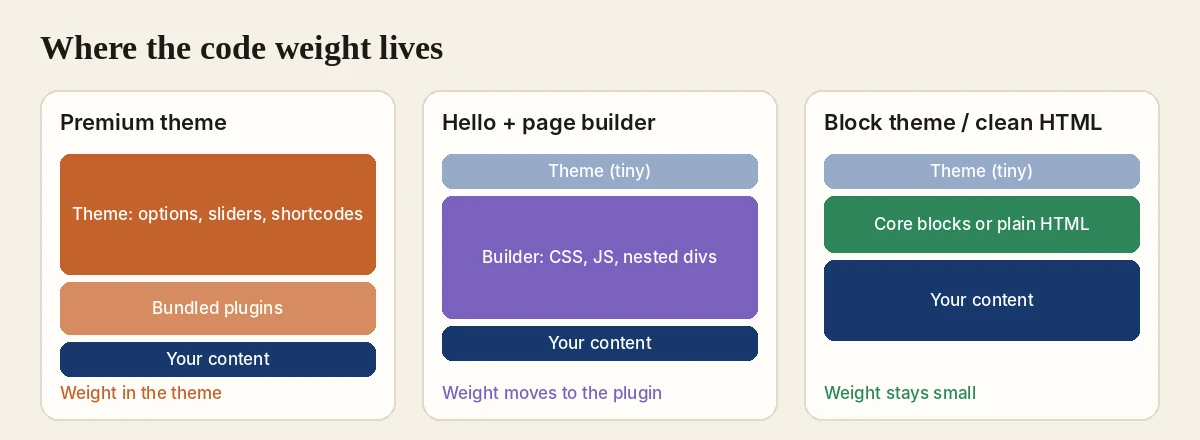
1. The weight moves; it doesn't disappear
Hello Elementor itself adds almost nothing to a page. But a heavy visual builder moves the performance cost from the theme to the plugin layer. A whole site built inside a page builder can end up with deeply nested markup ("div soup"), large JavaScript bundles and weaker Core Web Vitals, unless you add caching, minification and optimisation tools such as WP Rocket on top.
2. The native alternative: block themes and Full Site Editing
Many developers now skip third-party page builders entirely. Full Site Editing with a block theme, such as WordPress's own Twenty Twenty-Five, plus lightweight block libraries such as GenerateBlocks or Kadence Blocks, gives you the same "blank canvas plus AI" workflow, without a heavy builder plugin. Both libraries have free versions, so you don't need a builder subscription either.
3. AI is a builder, not a designer
AI can draft layouts, write components and produce copy in minutes. What it often misses is visual hierarchy, a consistent spacing system, responsive behaviour, accessibility (WCAG) and cross-browser quirks. Treat AI output as a strong first draft that still needs a human to refine it into clean, production-ready pages.
The modern comparison
| Approach | Advantages | Disadvantages |
|---|---|---|
| Traditional premium theme | Pre-styled layouts out of the box, niche features included, very little setup | Heavy code, database clutter, hard to customise past the theme's limits, strong lock-in |
| Blank canvas (Hello + page builder + AI) | Full design control, a clean theme layer, fast layout drafts with AI | Depends heavily on the builder plugin, deep markup, needs design and structure skills |
| Block theme / Full Site Editing + AI | Best core performance, no builder subscription, light output, built to last | A steeper learning curve for advanced dynamic layouts than drag-and-drop builders |
| Design elsewhere, publish clean HTML | Pages carry only the CSS and JavaScript they use; content stays plain HTML; works with any theme | Less suited to sites built around dynamic WordPress data such as query loops |
How to choose
- You want a finished look today and won't customise much: a focused premium theme from a reputable developer can still be fine. Avoid the 50-in-1 kind.
- You're comfortable in a visual builder and need speed: Hello (or GeneratePress or Astra) plus a builder works. Budget for performance tuning from day one.
- You care most about speed and longevity: a block theme with Full Site Editing and core blocks keeps the least code on each page and survives the longest.
- Whichever you pick: use AI for drafts and copy, then review hierarchy, spacing, mobile layouts and accessibility yourself.
Where Canvasly and Sidcraft fit
Both of our tools follow the "blank canvas, no bloat" idea, from two directions:
- Sidcraft Page Builder is a free WordPress builder that works with any theme. Pages without a Sidcraft layout load no Sidcraft CSS or JavaScript at all, unit scripts load only for the units on a page, and an AI Chat Bot drafts layouts you preview before applying.
- Canvasly Web Studio lets you design outside WordPress and import finished pages. Each page is a standard Custom HTML block with only the CSS and JavaScript it uses, so changing your theme can't break the design.
The bottom line
You almost certainly don't need a heavy, 50-in-1 premium theme anymore. Starting from a blank canvas and building with modern tools is better for your site's health. Just remember that the code weight doesn't vanish when you drop the theme: it moves to whatever you build with. Choose that layer carefully, and let AI speed up the work, not replace the review.
Frequently asked questions
Are premium WordPress themes worth it in 2026?
Usually not the "multipurpose, 50-demos-in-one" kind. They tend to bundle sliders, shortcodes, custom post types and hundreds of options you will never use, and they lock your content to the theme. A focused premium theme can still be worth it when it brings things you would otherwise build yourself, such as well-tested WooCommerce templates, accessibility and schema markup.
Is Hello Elementor enough to build a site?
Hello Elementor is a deliberately minimal theme, so on its own it does very little. It is meant to be paired with Elementor, which then does the design work. That works well, but the page weight moves from the theme to the page builder plugin, so keep an eye on page size and Core Web Vitals.
Can AI build a WordPress site without a theme?
AI can draft layouts, copy and component code very quickly, but it is a builder, not a designer. You still need someone to check hierarchy, spacing, responsive behaviour, accessibility and browser consistency before the site goes live.
What is the lightest way to build a WordPress site today?
A block theme with Full Site Editing and core blocks, or pages exported as clean HTML, keeps the least code on each page. Lightweight block libraries such as GenerateBlocks or Kadence Blocks add design options without a full page builder.
What happens to my site if I switch away from a premium theme?
With an all-in-one theme, pages often break: shortcodes show up as raw text and custom fields or layouts disappear. Sites built with core blocks, or with content stored as plain HTML, survive a theme change much better.
WordPress, Elementor, Hello Elementor, GeneratePress, Astra, Kadence, GenerateBlocks, ThemeForest and WP Rocket are trademarks of their owners. Canvasly is not affiliated with or endorsed by them.