
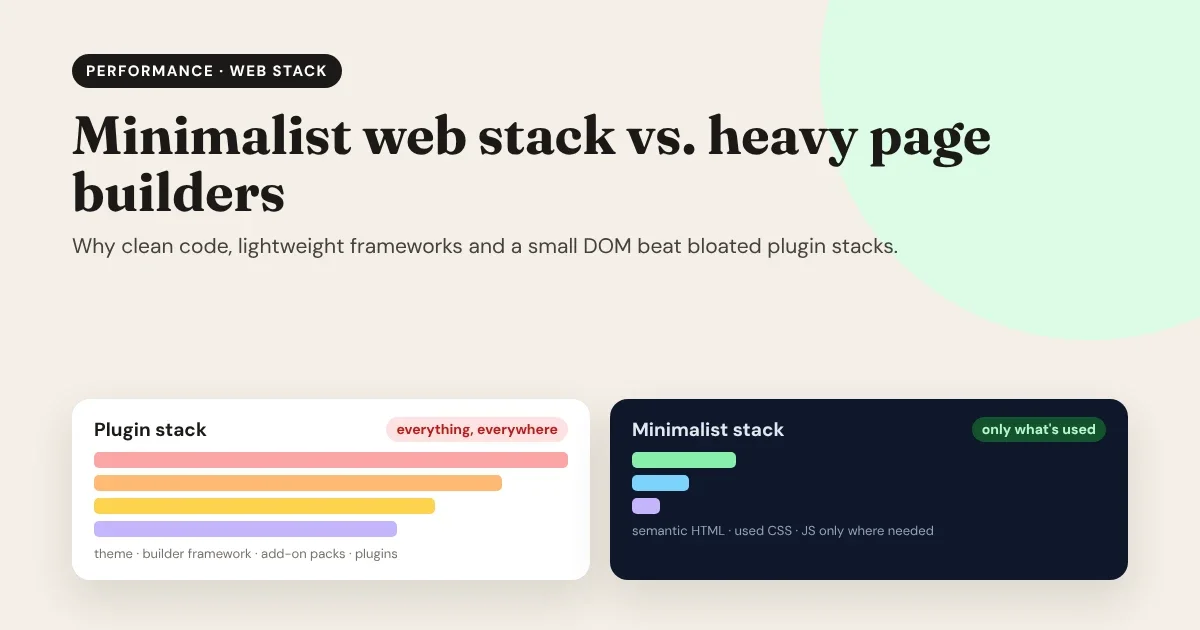
Every website is a promise to a visitor: "this will be worth the wait." The less they have to wait, the easier that promise is to keep. Heavy page builders made web design accessible to everyone, but they did it by sending visitors far more code than a page needs. A minimalist web stack flips that around: clean HTML, only the CSS and JavaScript a site actually uses, and a lightweight framework to deliver it. Here's why that wins, and how you can get it without giving up visual design.
The fastest code is the code you never send. Every stylesheet, script and wrapper a page doesn’t need is a cost your visitor pays, on every visit.
The principle
What makes a page builder stack "heavy"?
A typical WordPress site built with a visual page builder isn't one piece of software. It's four layers stacked on top of each other:
- The theme, with its own stylesheets, fonts and scripts.
- The builder's framework: the CSS and JavaScript every builder page needs to work.
- Add-on packs that bring extra widgets, each with more CSS and JavaScript.
- Plugins for sliders, forms, popups, galleries, analytics and SEO, which often load their files on every page, used or not.
Each layer is reasonable on its own. Together, a simple "About us" page can download the code for a slider, a popup and a contact form it doesn't have.
Why it matters: four costs of a bloated stack
1. Speed, and Google's Core Web Vitals
Google measures page experience with three Core Web Vitals. To pass, a page should reach:
- LCP (Largest Contentful Paint) within 2.5 seconds: the main content appears quickly.
- INP (Interaction to Next Paint) within 200 milliseconds: the page responds quickly to taps and clicks.
- CLS (Cumulative Layout Shift) of 0.1 or less: the layout doesn't jump around while loading.
Extra CSS delays the first paint. Extra JavaScript keeps the browser busy, so taps feel slow. Late-loading widgets push content around. Heavy stacks make all three harder.
2. DOM size: the cost you can't see
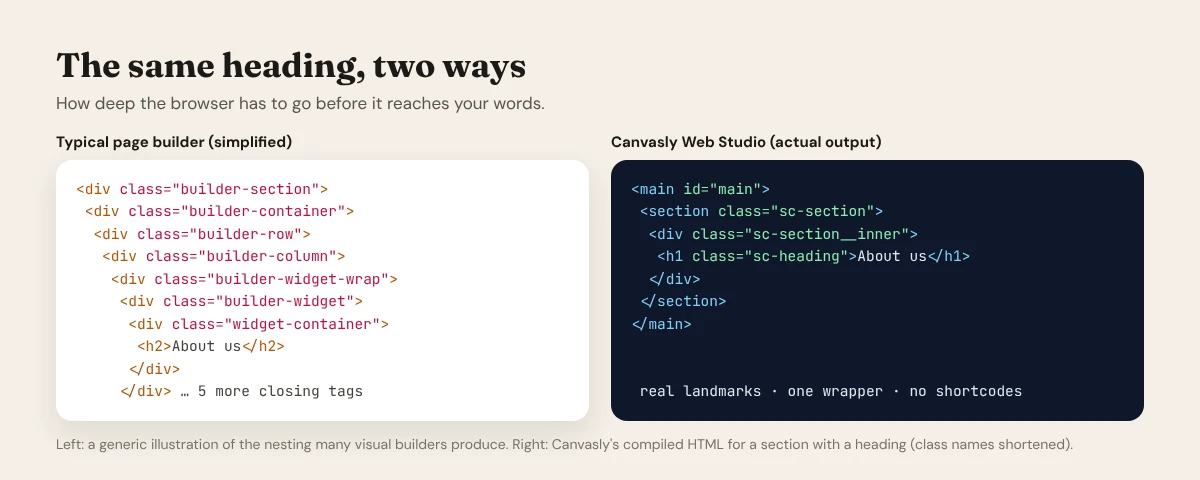
The DOM is the tree of elements the browser builds from your HTML. Every element costs memory and work, on every layout and every interaction. Visual builders often wrap one heading in six or seven nested <div>s, so a page quickly runs into thousands of elements.
Google's Lighthouse audit warns when a page has more than about 800 elements and flags it above 1,400. A large DOM makes styling slower, scrolling heavier and interactions laggier, especially on mid-range phones, which is what most of your visitors use.
3. Maintenance and security
Every plugin is code that has to be updated, can conflict with another plugin, and adds to the attack surface. A stack of twenty plugins means twenty update schedules and twenty chances for something to break after an update.
4. Lock-in
Builder layouts are stored in the builder's own format: shortcodes, JSON or custom blocks. Switch builders, switch themes, or move to a modern framework, and those pages often have to be rebuilt by hand.
What a minimalist web stack looks like
A minimalist stack does the same job with far less:
- Semantic HTML. Real landmarks (
<header>,<main>,<section>,<footer>) and real headings. Faster to render, easier for search engines and screen readers. - CSS for what's on the page, not for every possible widget. One small stylesheet instead of a framework.
- JavaScript only for interactivity. A text page needs none. A page with a slider loads the slider's code, and nothing else.
- Pre-rendered pages. Built once, served as files from fast global hosting, instead of assembled by PHP and a database on every visit.
- Lightweight frameworks when you need them. Astro ships zero JavaScript by default and adds it only where it's needed; Next.js pre-renders pages and refreshes them when content changes.
- Content kept separate. A CMS such as WordPress, EmDash or Payload stores the content; the front end only displays it.
A minimalist stack isn’t about doing less. It’s about sending less:
- Clean, semantic HTML instead of nested wrappers.
- Only the CSS and JavaScript the site actually uses.
- Pre-rendered pages on fast hosting, with content kept in a CMS.
Minimalist, not minimal
"But page builders are easier"
That's the real reason heavy builders won: they're visual. You drag, you see, you publish. A minimalist stack has traditionally meant writing code by hand, or hiring someone who does.
But visual design and lean code aren't opposites. The problem is where the builder runs. When the builder runs on your live site, every visitor pays for it. When the builder runs on your computer and compiles the design into clean code, visitors get only the result.
How Canvasly Web Studio delivers a minimalist stack, visually
Canvasly Web Studio is a visual design studio that works like a compiler. You design on a canvas with ready-made units; Canvasly turns the design into lean, standard code.
- Semantic HTML5 with real landmarks and headings, and no shortcodes.
- One small stylesheet with only the styles for the units you use.
- One small script, only if you need it. It contains only the interactive features your site uses. A site without interactive units ships no JavaScript at all.
- Images optimised for you, converted to WebP, plus a sitemap, robots.txt and structured data for search engines.
- Your choice of delivery: a static site for any host, or a Next.js, Astro, WordPress, EmDash, Payload, Grav or Railway project, published to Vercel, Netlify, GitHub Pages, FTP or SFTP.
Real numbers, not promises
We compiled two sample pages with Canvasly Web Studio and measured them in a browser:
| Page | HTML | CSS | JavaScript | Total | Elements | Deepest nesting |
|---|---|---|---|---|---|---|
| Landing page (menu, call to action, testimonials, FAQ, form) | 2.0 KB | 5.2 KB | 12.3 KB | 19.5 KB | 113 | 9 levels |
| Simple text page (heading, text, image, button) | 0.7 KB | 1.7 KB | 0 KB | 2.4 KB | 12 | 7 levels |
Sizes are as downloaded (gzip-compressed). Images and web fonts aren't included, since they depend on your content.
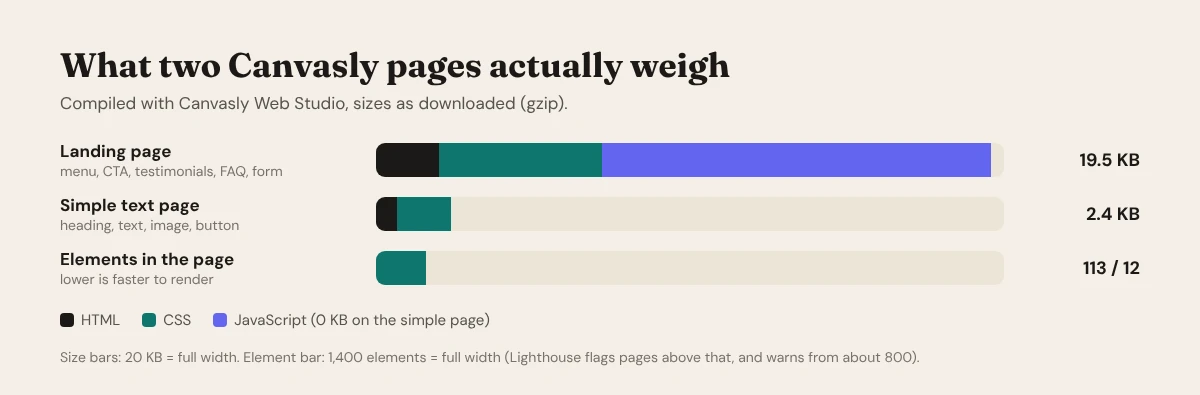
That's a whole landing page, with a working form and an interactive FAQ, in under 20 KB of code, and roughly a seventh of the element count at which Lighthouse starts warning.
Lean, even on WordPress
You don't have to leave WordPress to get a lean site:
- Export to WordPress: pages arrive as standard Custom HTML blocks, and the Canvasly full page template prints only the compiled page, without the theme's stylesheets or other plugins' scripts.
- Headless WordPress: keep WordPress (and WooCommerce) for writing and selling, and serve visitors a fast Next.js or Astro front end designed in Canvasly. See How to set up headless WordPress with Next.js or Astro.
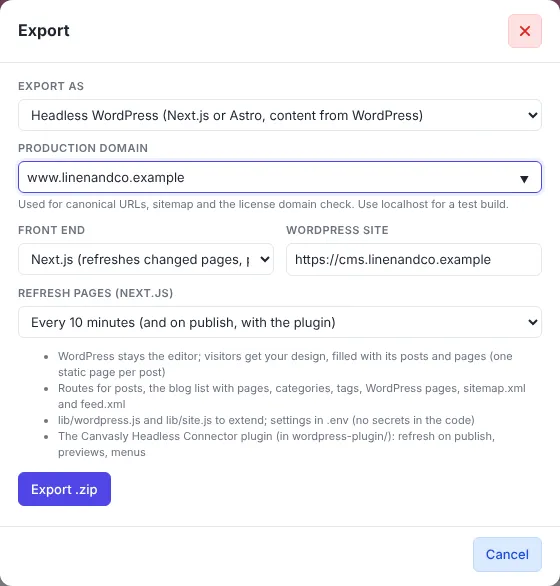
Design visually, ship clean code. Canvasly Web Studio runs the builder on your computer, not on your visitors’ phones.
The Canvasly approach
Audit your own site in ten minutes
Curious how heavy your current site is? Try this on your most important page:
- Run Lighthouse. In Chrome, open DevTools (F12) → Lighthouse → Mobile → Analyze page load. Note the Performance score, LCP, and the "Avoid an excessive DOM size" result.
- Check unused code. In DevTools, open the Coverage panel (Ctrl+Shift+P → "Coverage"), reload, and see how much of the CSS and JavaScript is never used.
- Count the requests. In the Network panel, reload and check how many CSS and JS files load, and how many kilobytes they add up to.
- View the source. Right-click → View page source and count the
<div>s around a single heading. - List your plugins. Which ones load files on pages that don't use them?
If your simple pages load hundreds of kilobytes of JavaScript, or thousands of elements, a leaner stack will make a visible difference.
When a heavy builder is still fine
To be fair: if your site is an internal tool, a short-lived campaign, or a site where speed and search ranking don't matter much, a heavy builder can be a reasonable shortcut. The trade-offs start to bite when your site is how customers find you, when most visitors arrive on phones, or when you'll be maintaining it for years.
Conclusion
Heavy page builders solved a real problem, making design visual, by shipping the builder to every visitor. A minimalist web stack solves the same problem the other way round: design visually, compile to clean code, and send visitors only what the page needs. Faster pages, better Core Web Vitals, fewer things to update, and a site you can take to any platform.
See the difference on your own pages. Try Canvasly Web Studio free for 7 days at canvasly.pro.
Related reading: Are WordPress page builders losing the market after AI? · The future of web development in the AI era