
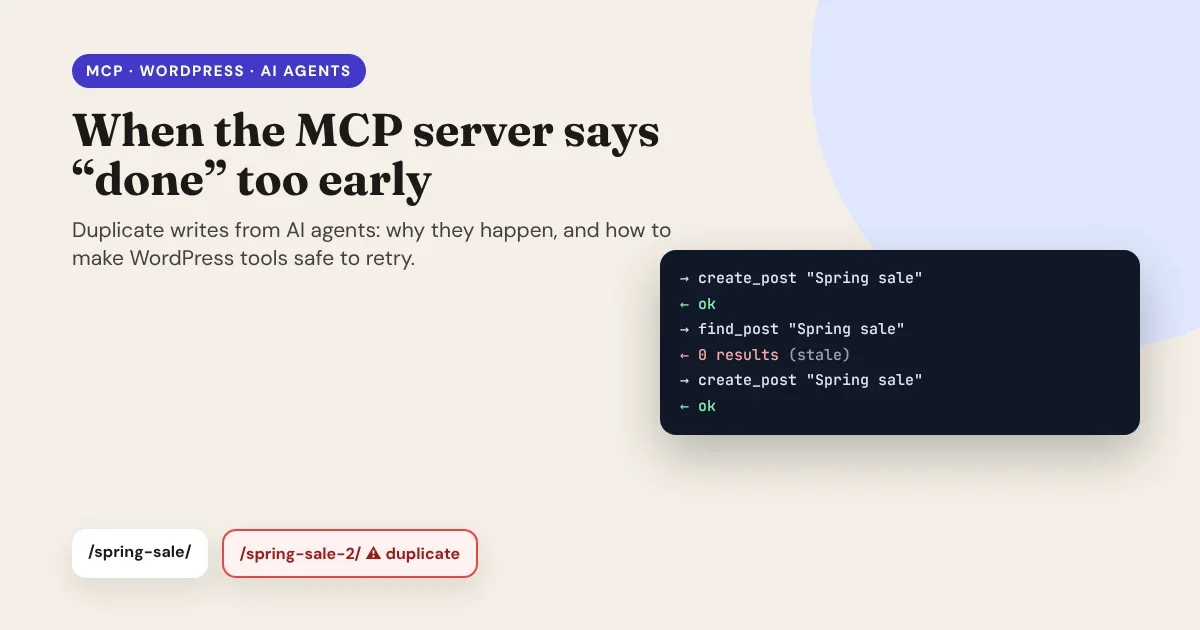
AI agents don't get tired, and they don't hesitate. That's what makes them useful, and it's also what makes them dangerous when a tool gives them the wrong signal. Ask an agent to create a post, give it a stale answer when it checks its work, and it will happily create the post again, as many times as it takes to "fix" a problem that never existed.
This article started as a discussion on X about WordPress and the Model Context Protocol (MCP). It turned into a good, practical lesson about building tools that AI agents can safely retry.
The conversation
During a discussion about MCP for WordPress, I wrote:
"Using a dedicated WordPress Model Context Protocol (MCP) server (such as the official https://WordPress.com MCP integration or an open-source WordPress MCP adapter) is a fundamentally different paradigm from manual scripting or raw API calls."
Another developer replied with a failure they had hit in production:
"The failure mode I hit was the server acking a write before the underlying DB flushed the WAL entry. Our agent then read stale config and issued a second mutation, causing duplicate resources."
Both statements are true, and they're connected. MCP is a different paradigm: instead of a developer writing a script that calls an API in a fixed order, an AI agent discovers tools, decides which to call, reads the results and decides what to do next. That loop is powerful. But it also means every answer a tool gives becomes an input to the agent's next decision. If an answer is wrong, even briefly, the agent acts on it.
An AI agent acts on every answer a tool gives it. If an answer is wrong, even for a second, the agent acts on that too.
- Scripts follow a fixed order.
- Agents read, reason, write and verify, in a loop.
Why MCP changes the rules
How a duplicate is born
An agent working through MCP usually runs a closed loop: read → reason → write → verify. The failure looks like this:
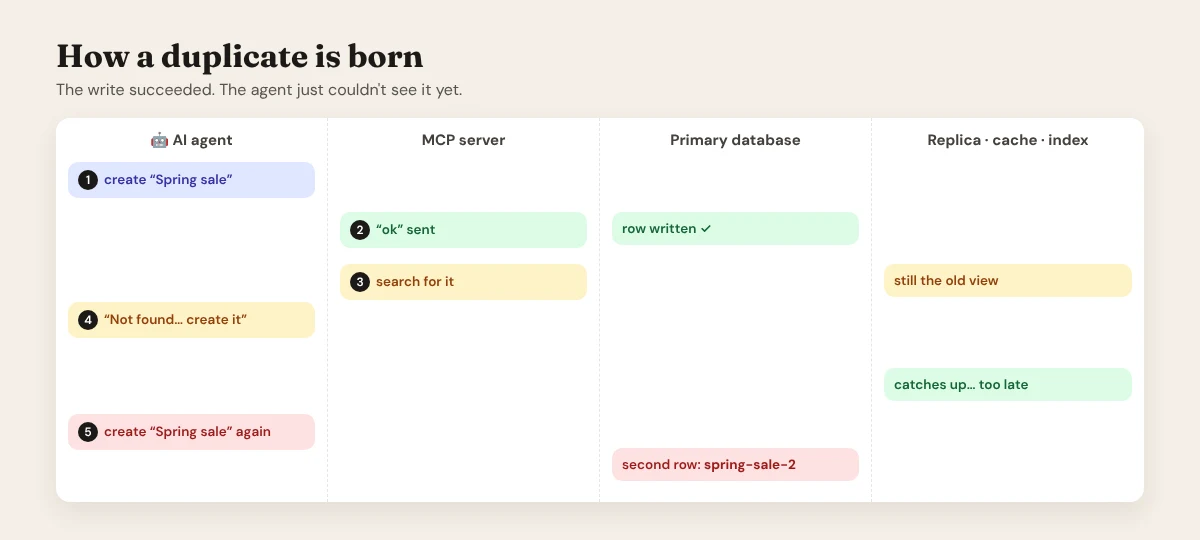
- The agent calls a tool to create a resource: a post, a page, a product, a setting.
- The MCP server replies "ok".
- The agent verifies its work, for example by searching for the post or reading the configuration.
- That read returns old data. The post "doesn't exist".
- The agent concludes the write failed and creates it again.
The agent behaved perfectly logically. It trusted the "ok", then trusted the read, and the two disagreed.
What really causes the stale read
The explanation often given for this bug is a database that acknowledges a commit before its write-ahead log (WAL) is flushed to disk. That setting exists: PostgreSQL's synchronous_commit = off, or MySQL's innodb_flush_log_at_trx_commit set to 0 or 2. But it's worth being precise about what it does.
Durability and visibility are different things. When a database commits without waiting for the log to reach the disk, the risk is losing that transaction if the server crashes in the next moment. The committed data is still visible to other queries on the same server straight away. So on a single database, an un-flushed WAL alone rarely explains a read that comes back empty a second later.
In practice, the stale read almost always comes from somewhere between the agent and the primary database:
| Where the stale data comes from | How it happens in WordPress setups |
|---|---|
| Read replicas | Hosting stacks that send reads to replicas (for example with HyperDB or LudicrousDB). Replication is usually asynchronous, so a replica can be a moment behind. |
| Object cache | A persistent object cache (Redis or Memcached) returns a cached query result or option that wasn't invalidated. |
| Page and CDN caches | A cached copy of a page, REST response or feed is served instead of fresh data. |
| Search indexes | Search via a separate index (Elasticsearch, Algolia) that updates seconds later. "Search for the title" is the most common way agents verify, and the slowest to catch up. |
| "Accepted" passed off as "done" | The tool queues the work (WP-Cron, Action Scheduler, a background job) and replies "ok" before the work has run. |
The fix isn't a single database setting. It's designing the tools so that a stale read can't turn into a second write.
Durability and visibility are different things. An un-flushed log risks losing a write in a crash; a stale read usually comes from a replica, a cache or an index.
- Fix the tools, not just the database settings.
- A stale read must never turn into a second write.
Where stale reads come from
WordPress makes duplicates easy to miss
WordPress has two habits that turn this race condition into a quiet mess instead of a loud error:
- Duplicate slugs don't fail. If a post with the slug
spring-salealready exists,wp_insert_post()doesn't reject the second one:wp_unique_post_slug()gives itspring-sale-2. Nothing errors, and the agent reports success twice. - There's no idempotency key in core. The core REST endpoints don't offer an idempotency-key header, and updates aren't checked against the version you read. If you want those guarantees, your MCP tools (or the plugin behind them) have to add them.
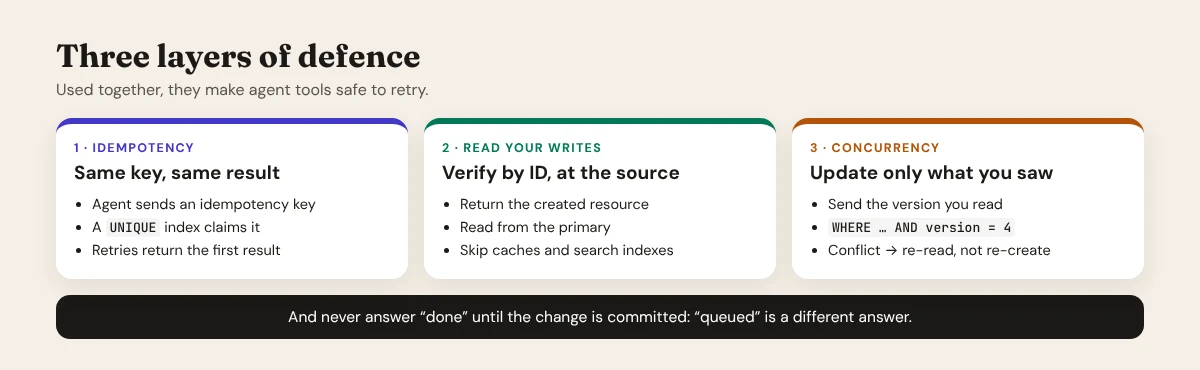
Three layers of defence
1. Idempotency keys and unique constraints
An idempotency key is a unique token the agent sends with every write, for example a UUID it generates once per intended action. The server records the key atomically, before doing the work. If the same key arrives again, the server returns the result of the first request instead of doing the work twice.
The important word is atomically. "Check whether the post exists, then create it" is exactly the race that failed. The check has to be a database constraint that only one request can win. In WordPress, a small table with a primary key on the idempotency key does the job:
// Once, when the plugin is activated: the PRIMARY KEY makes each key unique.
global $wpdb;
$table = $wpdb->prefix . 'agent_idempotency';
$wpdb->query( "CREATE TABLE IF NOT EXISTS {$table} (
    idem_key   CHAR(64)        NOT NULL PRIMARY KEY,
    post_id    BIGINT UNSIGNED NULL,
    created_at DATETIME        NOT NULL
) {$wpdb->get_charset_collate()}" );
// The create tool: claim the key first, then do the work.
function agent_create_post( array $postarr, string $key ) {
global $wpdb;
$table = $wpdb->prefix . 'agent_idempotency';
// Only one request can insert this key. A duplicate inserts 0 rows.
$claimed = $wpdb->query( $wpdb->prepare(
"INSERT IGNORE INTO {$table} (idem_key, created_at) VALUES (%s, UTC_TIMESTAMP())",
$key
) );
if ( 1 !== $claimed ) {
// Seen before: return the first result, or say it's still running.
$post_id = $wpdb->get_var( $wpdb->prepare( "SELECT post_id FROM {$table} WHERE idem_key = %s", $key ) );
return $post_id
? array( 'id' => (int) $post_id, 'replayed' => true )
: new WP_Error( 'in_progress', 'This request is still being processed.', array( 'status' => 409 ) );
}
$post_id = wp_insert_post( $postarr, true );
if ( is_wp_error( $post_id ) ) {
$wpdb->delete( $table, array( 'idem_key' => $key ) ); // let a retry try again
return $post_id;
}
$wpdb->update( $table, array( 'post_id' => $post_id ), array( 'idem_key' => $key ) );
return array( 'id' => $post_id, 'replayed' => false );
}The same idea works for any natural key: an external order ID, a product SKU, a hash of the request. Store it in a column with a UNIQUE index, and let the database say no.
2. Read-your-writes
When the agent verifies its own work, it must read from the source of truth, not from a copy that may lag:
- Return the result in the write response. The create tool should reply with the new post's ID, slug, status and modified time, so the agent doesn't need a second call to "find" it.
- Verify by ID, never by search.
GET /wp/v2/posts/123is precise. "Search for the title" depends on indexes and caches. - Pin the session to the primary. If your stack uses read replicas, route reads that follow a write in the same session to the primary database for a few seconds.
- Bypass caches for agent reads. Authenticated,
context=editrequests usually skip page caches; make sure your object cache is invalidated by the same code path that writes.
3. Optimistic concurrency
For updates, send the version you read and update only if it still matches. If someone else (or the agent's own earlier call) changed the resource in between, the update fails with a conflict instead of silently overwriting:
// Update only if the post hasn't changed since the agent read it.
global $wpdb;
$updated = $wpdb->query( $wpdb->prepare(
    "UPDATE {$wpdb->posts}
        SET post_title = %s, post_modified = %s, post_modified_gmt = %s
      WHERE ID = %d AND post_modified_gmt = %s",
    $new_title, current_time( 'mysql' ), current_time( 'mysql', true ),
    $post_id, $modified_gmt_the_agent_saw
) );

if ( 1 !== $updated ) {
    return new WP_Error( 'conflict', 'The post changed since you read it. Read it again.', array( 'status' => 409 ) );
}
clean_post_cache( $post_id );
Direct SQL like this skips WordPress hooks and revisions, so use it for simple, agent-specific fields. For full updates through wp_update_post(), take a short database lock around the check and the update (MySQL's GET_LOCK()), and keep the version comparison inside it.
The rule for the agent is just as important: a conflict means "read again", never "create again".
A conflict means “read again”, never “create again”.
- Same idempotency key, same result.
- Verify by ID, at the source.
- Update only the version you saw.
The rule for agents
Don't say "done" until it's done
Two server-side rules close the remaining gaps:
- Acknowledge only committed work. If a tool queues a job, it should say so: reply with a job ID and a status such as
queued, and offer a tool to check it. An agent that knows something is "in progress" waits; an agent that's told "ok" verifies, and may act on a stale answer. - Keep commits durable for important writes. For MySQL,
innodb_flush_log_at_trx_commit = 1(the default) flushes the redo log at every commit, andsync_binlog = 1(the MySQL default since 5.7.7; check your MariaDB settings, where it differs) keeps the binary log in step. If your reads come from replicas, semi-synchronous replication narrows the gap for critical data, at some cost in write speed.
A checklist for WordPress MCP tools
| Question | Good answer |
|---|---|
| Does every create tool accept an idempotency key? | Yes, claimed with a UNIQUE or primary key before the work starts |
| What does a retry with the same key return? | The first result, or "still in progress" |
| Does the write response include the created resource? | Yes: ID, slug, status and modified time |
| How does the agent verify? | By ID, from the primary, not via search |
| Do updates check the version the agent read? | Yes, and return a conflict instead of overwriting |
| Does the tool ever say "ok" for queued work? | No: it says "queued" and gives a job ID |
| Are duplicate slugs detected? | Yes, a natural key (or the idempotency key) stops them before -2 appears |
Where Canvasly Web Studio fits
Canvasly Web Studio has its own MCP server, but it's important to be clear about what it is: it's not a WordPress MCP server. AI apps such as Claude Code, Claude Desktop or Cursor use it to build pages, styles, menus and components in your Canvasly project, on your computer. WordPress stays your content source: Canvasly reads posts, pages and products through the REST API for headless sites, and doesn't use MCP to write to your WordPress database.
The same lessons shaped how Canvasly's MCP server handles writes:
- One change at a time per project. Changes from the AI are queued and applied in order, so two tool calls can't race each other on the same project.
- All or nothing. Each change runs through Canvasly's operation engine, which validates it as a whole: it's applied completely, or not at all.
- The reply comes after the save. The tool answers once the change is saved to the project file, written to a temporary file and then renamed into place, with a rolling backup of the previous version.
- You see it, and you can undo it. The open editor shows the change straight away, and Ctrl+Z undoes it.
- Local and token-protected. The server listens only on your own computer and needs a token; script and delete actions need an extra switch.
Read more in Can Claude Opus 5.5 Build a Complex eCommerce Website? and How to Set Up Headless WordPress.
Conclusion
MCP really is a different paradigm from scripts and raw API calls. That's exactly why tool design matters more, not less. An AI agent will act on every answer a tool gives it, so the tools have to give answers that stay true when they're retried, read back, or raced.
Claim an idempotency key before you do the work. Return what you created, and verify by ID at the source. Check versions on updates. And never say "done" for work that's only queued. With those four habits, a stale read becomes a harmless "already exists" instead of a duplicate in production.
Want to see an MCP server built for safe, visible changes? Download Canvasly Web Studio and try it free for 7 days. Connect Claude Code through MCP and watch every change appear in the editor, with undo.